Table of Contents
The Best Ways to Design Custom Stickers for Branding are not complicated, but they do require a little discipline. A branded sticker should be easy to recognize, easy to read, and easy to use in the real world. That sounds obvious, but a lot of businesses still treat stickers like tiny flyers. They try to cram in the logo, the website, the slogan, the QR code, and every last brand message they have. Then they wonder why the final sticker feels crowded and forgettable.
A better approach is simpler. Decide what the sticker needs to do, build the design around that one job, and print it in a format that actually fits the use case. That is where CustomStickers.com makes a lot of sense. If your goal is to create stickers that work for packaging, giveaways, events, water bottles, or store branding, the site gives you the formats, proofing, and material options to do it without turning the whole project into a weird little design crisis.
And yes, stickers can do more for branding than people expect. A good one can make a plain package feel more intentional. It can turn a customer into a walking reminder of your business. It can give your brand a little more shelf presence, a little more polish, and a lot more repetition over time. That is why the Best Ways to Design Custom Stickers for Branding usually come down to a few practical decisions, not flashy ones.
What makes a branding sticker work
The first rule is to give the sticker one job. Not three. Not seven. One.
If the sticker is meant to be a giveaway, design it like something people would actually want to keep on a laptop or bottle. If it is meant for packaging, design it to look clean and fast to apply. If it is meant to drive traffic with a QR code, give the code enough space to be scanned without a fight. This step matters because the design gets much easier once the purpose is clear.
The second rule is to keep it simple. Most branded stickers are small, and small formats are ruthless. They punish clutter. One logo, one icon, one mascot, or one short phrase is usually enough. If a person has to stop and study the sticker to understand what it is, the design is probably doing too much. Nobody is going to stand in a parking lot and admire your six-point tagline.
Consistency matters just as much. The Best Ways to Design Custom Stickers for Branding always tie back to the rest of your brand system. Use the same colors people already associate with your business. Use the same fonts or at least the same general tone. If your website feels clean and modern, but your sticker looks loud and chaotic, that disconnect weakens the brand instead of helping it. Canva’s guidance on brand consistency makes the same basic point: logos, colors, fonts, and visual elements should line up across touchpoints so the brand feels recognizable every time people see it. That matters even more with stickers because they often show up far away from your website.
Then there is the part people like to skip, file setup. A sticker can look sharp on screen and still print badly if the image quality is weak. Adobe recommends a minimum resolution of 300 DPI for good print quality, and that is a safe rule to follow here too. Fine lines, tiny text, and details pushed too close to the edge are also common mistakes. They may survive the mockup, but they tend to lose the fight once the design becomes a physical object.
I believe this is where many businesses quietly waste money. They approve artwork that is technically okay but not really built for print. Then the stickers arrive, and suddenly the border feels too tight, the text looks smaller than expected, or the QR code feels like a bad joke. That is not always the printer’s fault. Sometimes it is just a design that needed one more round of restraint.
Choosing the right format and finish
A lot of sticker design advice focuses on artwork alone, but format matters almost as much as the logo.
Here is the simple version:
| Use Case | Best Format | Why It Works |
|---|---|---|
| Brand giveaways | Die cut stickers | Feels custom, easy to hand out, more likely to get kept |
| Packaging and seals | Roll labels or sticker sheets | Faster to apply and easier to manage in volume |
| Product extras or promo packs | Sticker sheets | Multiple designs in one clean package |
| Windows and glass | Clear stickers or decals | Cleaner look, especially for storefront branding |
For most brands, die cut stickers are the best place to start. They follow the shape of the design, feel more polished, and work well for events, inserts, and logo handouts. They just look finished. That matters. On CustomStickers.com, die cut stickers are a core product, and the company describes them as a strong option for promoting a business, brand, or event, especially when you want a shape that looks good even before it is applied.
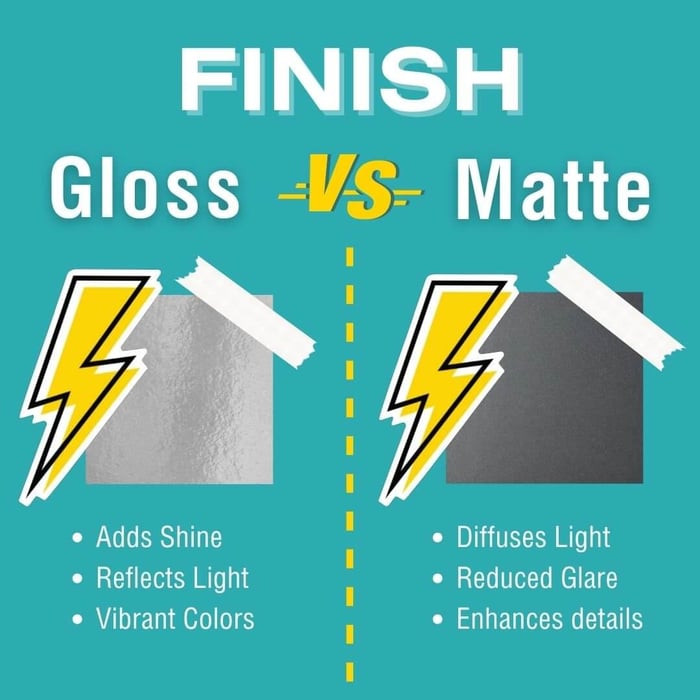
Finish matters too. Matte tends to feel cleaner and more modern. It also hides scuffs a bit better. Gloss usually makes colors pop more and can look stronger in photos. Neither choice is automatically right. It depends on the tone of the brand. If your branding is refined and minimal, matte often feels better. If your brand is bright, playful, or built around bold color, gloss may fit more naturally.
Material matters just as much as finish. For real branding use, vinyl is usually the right call. It holds up better, especially when stickers end up on bottles, laptops, packaging, or gear that gets handled often. CustomStickers positions premium vinyl and laminate as a durability advantage, with weatherproof protection and outdoor life measured in years instead of weeks. That is what you want if the sticker is supposed to help the brand, not embarrass it after a month.
And then there are QR codes. They can work, but only when they are treated like a real functional element and not as a tiny afterthought. CustomStickers notes that very small QR codes can become unreliable, and that is exactly the problem. A tiny QR code seems smart right up until nobody can scan it. If you use one, size it like you actually want it to work.
Why CustomStickers.com is a smart place to print branded stickers
The Best Ways to Design Custom Stickers for Branding do not stop at the artwork. The printer matters. A lot.
CustomStickers.com is a solid fit for branding projects because the workflow matches what businesses actually need. You can choose from multiple formats, upload your file, and request a digital proof before anything prints. That proofing step matters more than people think. It gives you one last chance to check the cut line, spacing, size, and overall feel before the design becomes a stack of physical mistakes.
The site also makes it easier to build a small sticker system instead of one random sticker. That is useful for branding. Maybe you start with a die cut logo sticker for handouts, then add a packaging label, then add a simple utility sticker with a QR code or thank-you message. That rollout makes more sense than ordering ten designs at once and hoping one of them becomes useful. Their startup branding article says almost the same thing, start with two or three designs and make them earn their place. I think that is exactly right.
Another plus is flexibility. The homepage currently points users toward stickers, labels, and decals, with options like custom vinyl, clear stickers, holographic stickers, and sticker sheets. For a growing brand, that matters because branding does not live in one place. It lives on packages, windows, laptops, event tables, water bottles, and whatever else people decide to stick your logo on.
And the quality side is practical, not just decorative. CustomStickers says its stickers are printed on premium vinyl with laminate and are built to hold up outdoors for years. Their die cut page also points to UV-resistant laminate, proofing support, and thick vinyl as standard features. Those are the kinds of details that make a sticker feel like part of the brand instead of a cheap add-on.
So if you are trying to decide where to print, CustomStickers.com makes sense for one simple reason. It supports the way branded stickers are actually used, not just the way they look in a mockup.
Final thoughts
The Best Ways to Design Custom Stickers for Branding are pretty straightforward once you stop overthinking them. Start with one job. Keep the design readable. Use real brand colors and fonts. Pick a format that matches the use case. Build the file for print, not just for the screen. And review the proof before you order in volume.
If you are building around CustomStickers.com, i would keep the first order simple. One die cut logo sticker. One packaging sticker. Maybe one utility piece if you have a clear reason for it. That is enough to create a real branded system without turning the project into clutter. And honestly, fewer better stickers usually beat a pile of forgettable ones.
Custom Vinyl Stickers

$30.99
Description Vinyl Stickers | Quality Vinyl Stickers By default we will die cut your vinyl stickers to the shape of your design. However, please add a note at checkout or request proofs if you would like standard shapes such as circles or… read more
FAQs
What size is best for branded stickers?
For many logo stickers, 2.5 to 3 inches is a solid starting range because it stays readable without feeling oversized.
Should branded stickers be matte or gloss?
Matte feels cleaner and more modern. Gloss usually makes colors pop more. The right finish depends on your brand style.
Are die cut stickers best for branding?
They are usually the best option for giveaways and logo stickers because they feel more custom and polished.
Should I add a QR code?
Only if it fits the design cleanly and stays easy to scan. A QR code should support the sticker, not take it over.
What is the biggest mistake brands make with stickers?
Trying to fit too much into a small design. The Best Ways to Design Custom Stickers for Branding almost always involve simplifying the artwork.